




OUR BROWSER EXTENSIONS

Turn the web into a research workspace

Whether you’re saving and annotating sources, organizing notes and topics, or preparing your research for AI-assisted work, our extensions work seamlessly with your projects in PowerNotes to help you tame the web and keep your research organized.
TRUSTED BY LEADNG INSTITUTIONS

Built to support core academic research activities

Persistent Highlighting

Highlight and annotate sources directly on web pages and PDFs. PowerNotes ensures those color coded text highlights and annotations are saved to your projects.

Fast Bookmarking

Streamlined saving of sources ensuring maximum performance across tabs and browser sessions, and eliminating the need to keep piles of tabs open.

Citation Management

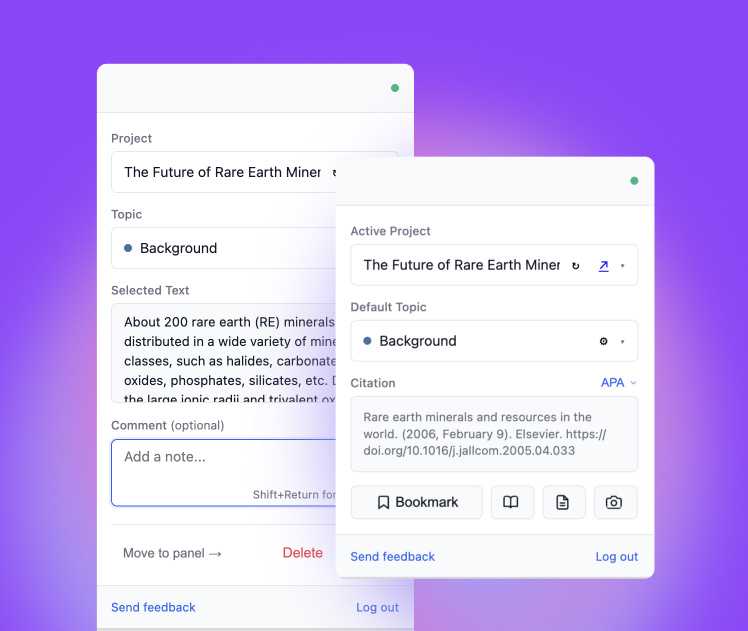
Our extensions automatically capture  metadata for proper citations, and we support most citation formats (e.g. MLA, APA, Chicago) to reduce citation errors.

Capture Screenshots

Capture visuals, figures, or charts, through a integrated screenshot tool. Screenshots are automatically linked to the source URL, and are cited and stored in your projects.

Integrated Library Search

If your school has registered with PowerNotes, when you search the web, we'll also display results from your library to reinforce trusted academic resources.

Accurate Legal Citations

When researching on WestLaw & Lexis, inline citations are automatically captured for  highlights and annotations, keeping context and claims properly referenced.

Mobile Support

PowerNotes supports Mobile Safari, so you can read, highlight, and save sources on your phone or tablet with the same structure and traceability as desktop.

Integrated Reader View

PowerNotes provides a streamlined reader view that works seamlessly across articles and PDFs. Highlights, annotations, and citations stay anchored to the source.

Project-Based Workspaces

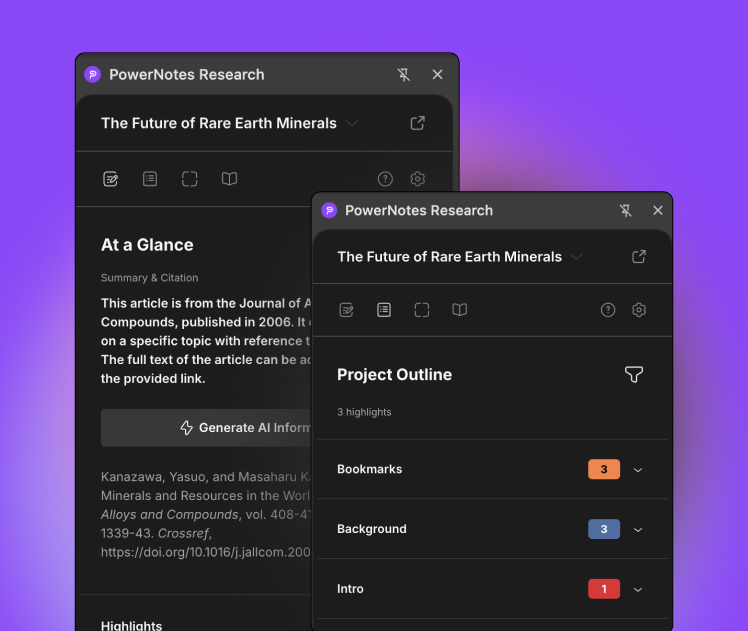
Everything you capture is anchored to a project in PowerNotes, keeping research scoped and organized for further academic, or personal research work.

Source-Grounded AI

Whether you use AI directly within PowerNotes, or plug PowerNotes into your favorite LLM, all conversations and interactions are grounded by the sources you've saved to your project.

SSO Support

If you're a student at a supported institution, you can use your university credentials with PowerNotes, our browser extensions, and Claude & ChatGPT Integrations.

LMS Integration

Connect to PowerNotes directly through our integrations with leading LMS's like Canvas, Moodle, D2L and more

Tagline

Explore PowerNotes

PowerNotes Researcher Extension

A robust browser extension for those who want additional topic, citation, and source management while working with directly their sources.

Install Now

Claude and ChatGPT Extensions (beta)

Work with sources, highlights, annotations, and notes you've saved in PowerNotes directly within Caude and ChatGPT.

Coming Soon

PowerNotes Workspace

Our fully enabled end-to-end platform for managing academic research projects, complete with LMS Integration, SSO, AI Governance and more.

An All-in-One Platform for
Academic Research

Save big by replacing multiple subscriptions with PowerNotes.

“Part of the worry about how students might use a tool like ChatGPT is rooted in an apparently pervasive belief that students would much rather cheat than do the work. I still believe students want to learn, but this means giving them something worth doing.”

John Warner

Writing Professor

On ChatGPT: “While the tool may be able to provide quick and easy answers to questions, it does not build critical-thinking and problem-solving skills, which are essential for academic and lifelong success.”

New York City Department of Education

“Navigating a new world with ChatGPT may be challenging in some ways, but it also may provide faculty with opportunities to make their classrooms more inclusive and further improve student writing. If we view ChatGPT as a tool, rather than a threat, maybe (just maybe) a future world with ChatGPT will be a world with more “good” writers.”

Sarah Parsons, Hannah Davis, Rene Caputo, and Miranda Welsh

Duke Thompson Writing Program (TWP) Faculty

“If you can create an atmosphere where students are invested in learning, they are not going to reach for a workaround. They are not going to plagiarize. They are not going to copy, they are not going to dodge the work. But the work has to be worth doing on some level, beyond getting the grade.”

John Warner

Writing Professor

“Educators would do well to find a way not only to live with the technology but also to incorporate it into our pedagogies. Training students to become good critical readers and effective editors is an ambitious goal, one that will require a major shift for many of us, but it also is a challenge we would do well to embrace sooner rather than later.”

Rachel Elliott​ Rigolino

State University of New York at New Paltz